
最近在Twitch看到有幾個妹子玩Counter-Strike: Global Offensive [1](簡稱CS:GO), 到沒屋頂搜尋了一下正版序號才210元 [2],買了一個來玩,回味一下16年前迷的遊戲,順便手癢改了自己專屬的設定檔,感覺跟以前差不多,但都被打假的~哈哈
自動啟動方式也很簡單
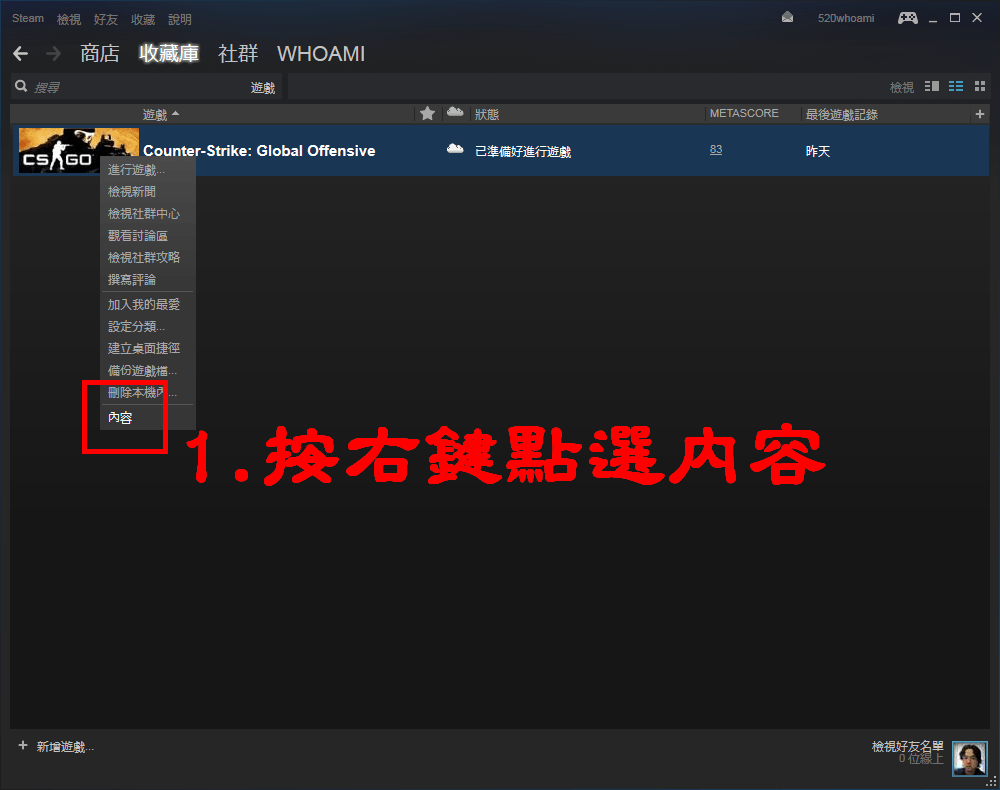
1.先執行Stram主程式,點選上方的「檢視」→「遊戲清單」,然後在CS:GO的圖上按右鍵點選「內容」。
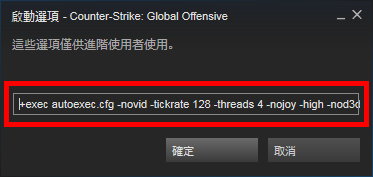
2.在新跳出來的視窗,點選「設定啟動選項…」
3.在框框內輸入
+exec autoexec.cfg -novid -tickrate 128 -high -nod3d9ex1 -nojoy -threads 4
4.在遊戲目錄新增一個autoexec.cfg
C:\<span style="color: #ff0000; font-size: medium;">Program Files (x86)</span>\<span style="color: #1fc6f0; font-size: medium;">Steam</span>\<span style="color: #ff0000; font-size: medium;">steamapps</span>\<span style="color: #1fc6f0; font-size: medium;">common</span>\<span style="color: #ff0000; font-size: medium;">Counter-Strike Global Offensive</span>\<span style="color: #1fc6f0; font-size: medium;">csgo</span>\<span style="color: #ff0000; font-size: medium;">cfg</span>
5.再照狀況把下列我設定的參數貼上去即可,但切記靈敏度別跟著套用2.7就好,我是使用1920X1080的畫面,不一定適用每種畫面、每種滑鼠,但一定得把加速關掉才能還原到最真實的環境。
 [3]
[3]
 [4]
[4]
 [5]
[5]
// ==================================================
// Counter-Strike Autoexec Config CS自動執行檔
// 本cfg請放在C:\Program Files (x86)\Steam\steamapps\common\Counter-Strike Global Offensive\csgo\cfg
// 並參考下方CSGO : Launch Options的網址做設定
// ==================================================
// 自動啟動方式:
// 1.先執行Stram主程式,點選上方的「檢視」→「遊戲清單」,然後在CS:GO的圖上按右鍵點選「內容」。
// 2.在新跳出來的視窗,點選「設定啟動選項…」
// 3.在框框內輸入
// +exec autoexec.cfg -novid -tickrate 128 -high -nod3d9ex1 -nojoy -threads 4
// ==================================================
// CSGO : Launch Options
// https://steamcommunity.com/sharedfiles/filedetails/?id=379782151
// 【攻略】CS:GO指令輸入器Config教學(1/21更新:狙擊鏡準星寬度等)
// http://forum.gamer.com.tw/C.php?bsn=01473&snA=22823
// ==================================================
// 網路設定
// ==================================================
// 連線網路速率
rate "160000"
cl_updaterate "128"
cl_cmdrate "128"
cl_interp "0"
cl_interp_ratio "1"
// FPS最高數值
fps_max "300"
// ==================================================
// 滑鼠設定
// How to choose your sensitivity in CS:GO
// http://steamcommunity.com/sharedfiles/filedetails/?id=126920260
// ==================================================
// 狙擊鏡的靈敏度
zoom_sensitivity_ratio_mouse "1"
// 設定使用狙擊鏡時滑鼠的移動速度
zoom_sensitivity_ratio "1.25"
// 滑鼠採用原生輸入方式
m_rawinput "1"
// 關閉遊戲內的滑鼠加速
m_customaccel "0"
// 滑鼠加速的量
m_customaccel_exponent "0"
// 關閉Win7/8/10的滑鼠加速
m_mousespeed "0"
m_mouseaccel1 "0"
m_mouseaccel2 "0"
// 啟動滑鼠過濾器(提昇畫面順暢度)
m_filter "1"
// ==================================================
// 一般設定
// ==================================================
// 啟動快速切換槍枝功能
hud_fastswitch "1"
// 玩家名字置中顯示
hud_centerid "1"
// 顯示目標或物品名稱ID
hud_showtargetid "1"
// 地圖顯示精緻度
mp_decals "300"
// 停用撿起武器時自動切換到該武器
cl_autowepswitch "0"
// 在遊戲中左上角顯示FPS數值
cl_showfps "1"
// 顯示文字武器選單
setinfo vgui_menus "0"
// 不顯示自動幫助的提示
setinfo ah "0"
// 換地圖後不顯示地圖的簡介
setinfo dm "0"
// 觀察模式時不顯示鬼魂
setinfo ghosts "0"
// ==================================================
// 準心模式
// http://tools.dathost.net/
// ==================================================
cl_dynamiccrosshair "0"
cl_crosshairalpha "255"
cl_crosshaircolor "1"
cl_crosshaircolor_b "0"
cl_crosshaircolor_r "0"
cl_crosshaircolor_g "0"
cl_crosshairdot "0"
cl_crosshairgap "0"
cl_crosshairsize "5"
cl_crosshairstyle "4"
cl_crosshairusealpha "1"
cl_crosshairthickness "1"
cl_fixedcrosshairgap "0"
cl_crosshair_outlinethickness "0"
cl_crosshair_drawoutline "0"
// ==================================================
// 雷達指令設置,我的設定是將雷達放到最大並將地圖範圍縮是整張都看的到
// ==================================================
cl_show_clan_in_death_notice "1"
cl_hud_radar_scale "1.3"	// 整個雷達的大小 max.1.3 min.0.8
cl_radar_scale "0.35"	// 雷達內地圖的大小 max.1 min.0.25
cl_radar_rotate "1"	// 雷達是否旋轉
cl_radar_always_centered "0"	// 雷達是否以自身為中心
cl_radar_icon_scale_min "0.4"	// 雷達原點大小 max.1 min.0.4
cl_teammate_colors_show "1"	// 顯示隊伍顏色
// ==================================================
// 自動購買系統
// BASIC CS:GO Buy Binds
// http://steamcommunity.com/sharedfiles/filedetails/?id=203603867
// CS:GO BINDS GENERATOR
// http://tools.dathost.net/csgobindsgenerator
// http://csgobuynds.com/buy-binds-generator.html
// ==================================================
bind "`" "toggleconsole"			// 按~鍵打開命令行
bind "F6" "disconnect"				// 按F6鍵快速退出伺服器
bind "F7" "exit"				// 按F7鍵快速回到桌面
bind "MWHEELDOWN" "weapon_hegrenade"	// 滑鼠中鍵往下使用手榴彈
bind "MWHEELUP" "weapon_flashbang"	// 滑鼠中鍵往上使用閃光彈
bind "MOUSE3" "weapon_smokegrenade"	// 按下滑鼠中鍵使用煙霧彈
// 一鍵購買武裝
bind "KP_INS" "buy vesthelm; buy vest;"		// 按小鍵盤的0鍵買防彈衣
bind "KP_END" "buy deagle;"				// 按小鍵盤的1鍵買沙漠之鷹
bind "KP_DOWNARROW" "buy mp7;"			// 按小鍵盤的2鍵買衝鋒槍
bind "KP_PGDN" "buy galilar; buy famas;"		// 按小鍵盤的3鍵買輕型步槍
bind "KP_LEFTARROW" "buy ak47; buy m4a1;"		// 按小鍵盤的4鍵買主力步槍
bind "KP_5" "buy sg556; buy aug;"			// 按小鍵盤的5鍵買重型步槍
bind "KP_RIGHTARROW" "buy defuser;"		// 按小鍵盤的6鍵買拆彈包
bind "KP_HOME" "buy flashbang; buy flashbang;"	// 按小鍵盤的7鍵買閃光彈
bind "KP_UPARROW" "buy hegrenade;"		// 按小鍵盤的8鍵買手榴彈
bind "KP_PGUP" "buy smokegrenade;"			// 按小鍵盤的9鍵買煙霧彈
bind "LEFTARROW" "buy deagle;"			// 按左箭頭鍵買沙漠之鷹
bind "RIGHTARROW" "buy mp7;"			// 按右箭頭鍵買衝鋒槍
bind "UPARROW" "buy sg556; buy aug;"		// 按上箭頭鍵買重型步槍
bind "DOWNARROW" "buy ak47; buy m4a1;"		// 按下箭頭鍵買主力步槍
// 一鍵購買全套
bind "INS" "buy m4a1; buy vesthelm; buy defuser; buy flashbang; buy flashbang; buy hegrenade; buy smokegrenade;"	// 按INS鍵買警察全套
bind "DEL" "buy ak47; buy vesthelm; buy flashbang; buy hegrenade; buy smokegrenade;"				// 按DEL鍵買歹徒全套
bind "HOME" "buy deagle; buy vesthelm; buy flashbang; buy flashbang; buy hegrenade; buy smokegrenade;"		// 按HOME鍵買沙漠之鷹全套
bind "END" "buy mp7; buy vesthelm; buy flashbang; buy flashbang; buy hegrenade; buy smokegrenade;"		// 按END鍵買衝鋒槍全套
// ==================================================
// 團隊訊息按鍵設定
// ==================================================
bind "ALT" "enemyspot;say_team ENEMY CONTACT@wHOaMi"
bind "F2" "needbackup;say_team I HAVE C4@wHOaMi"
// ==================================================
// 網路連線速度和FPS值資訊的顯示設定
// ==================================================
alias graph_tog graph_1
alias graph_1 "net_graph 1; alias graph_tog graph_1" // 按\鍵就可以顯示網路連線速度和fps值的資訊.
alias graph_2 "net_graph 2; alias graph_tog graph_2"
alias graph_3 "net_graph 3; alias graph_tog graph_3"
alias graph_0 "net_graph 0; alias graph_tog graph_0"
bind "\" "graph_tog"
// ==================================================
ECHO ===][     wHOaMi's CFG v0.2     ][=====
// ==================================================